
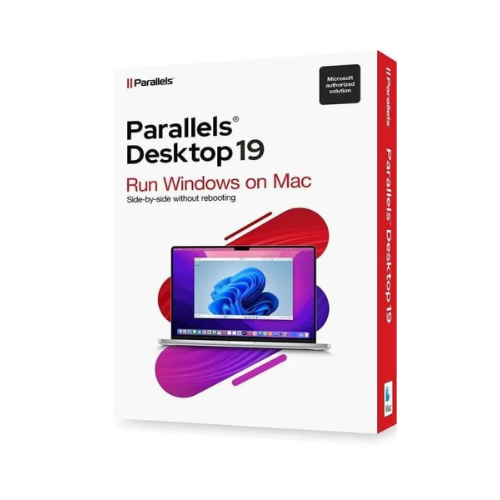
Parallels Desktop 19 PRO (1 MAC – 1 Jahr) ESD

90,61 €
- Beschreibung
- Zusätzliche Informationen
Beschreibung
Produktinformationen: Parallels Desktop 19 Pro MACFühren Sie Windows und macOS gleichzeitig auf einem Mac aus:
- Führen Sie Windows-Anwendungen auf Ihrem Intel- oder Apple-Mac-Computer aus.
- Kopieren und Einfügen von Text ohne Probleme zwischen Mac und Windows oder Dateien per Drag-and-Drop übertragen.
- Optimiert für das neueste Windows 11 und macOS Ventura.
- Entwickeln und testen Sie mit mehreren Betriebssystemen in einer virtuellen Mac-Maschine.
- Verstehen Sie die Parallels Toolbox – mit über 40 One-Touch-Tools für Mac und PC.
Funktionen von Parallels Desktop 19 für MAC:
Egal, ob Sie Windows-Programme benötigen, für die es keine Mac-Version gibt, oder ob Sie von einem PC zu einem Mac wechseln und Ihre Daten übertragen müssen, Parallels Desktop hat, was Sie brauchen.Ultimative Flexibilität:
- Funktioniert mit Windows 11, 10, 8.1 und 7, Linux, macOS* und mehr. Sie müssen sich nicht mehr zwischen PC und Mac entscheiden.
- Kompatibel mit Boot Camp. Verwenden Sie Ihre vorhandene Boot Camp-Installation.
Personalisierung mit einem Klick:
- Wählen Sie Productivity, Gaming, DesignPRO, Software TestingPRO oder DevelopmentPRO: Parallels Desktop optimiert automatisch die Einstellungen und die Leistung Ihrer virtuellen Maschine.
Schnell, leistungsstark und einfach:
- Führen Sie Tausende von Windows-Programmen ohne Leistungsverlust oder Neustart aus.
- Nutzen Sie Windows und macOS nahtlos und parallel auf Ihrem MacBook, iMac, Mac mini oder Mac Pro.
- Teilen Sie Dateien und Ordner, kopieren und fügen Sie Bilder und Text ein und verschieben Sie Dateien zwischen Mac- und Windows-Anwendungen.
Einfache Installation:
- Parallels Desktop erkennt automatisch, was Sie benötigen, sodass Sie innerhalb von Minuten starten können.
- Wenn Sie Windows benötigen, werden Sie aufgefordert, Windows 11 herunterzuladen und zu installieren oder Ihre Boot Camp-Installation zu verwenden, wenn Sie einen Intel-basierten Mac haben.
Schnell wie der Blitz:
- Grafisch komplexe und anspruchsvolle Windows-Anwendungen laufen mühelos und verlangsamen Ihren Mac nicht.
- Spielen Sie Ihre reinen Windows-Spiele auf Ihrem Mac.
Wählen Sie Ihre Perspektive:
- Machen Sie Windows unsichtbar, während Sie weiterhin Windows-Anwendungen im Coherence™-Modus verwenden.
- Konfigurieren Sie Windows so, dass es den gesamten Bildschirm einnimmt, wenn Sie mit dieser Oberfläche vertrauter sind.
Arbeiten Sie smarter:
- Führen Sie klassische Windows-Anwendungen, die auf Intel (x86) basieren, auf Ihrem M-Serie Mac aus.
Support für macOS Ventura:
- Parallels Desktop unterstützt macOS Ventura (sofern veröffentlicht), macOS Monterey, macOS Big Sur 11, macOS Catalina 10.15 und macOS Mojave 10.14.
Vergleichstabelle der verschiedenen Versionen von Parallels Desktop:
| Funktionen der Versionen | Standard | Pro | Geschäft |
|---|---|---|---|
| Für macOS Ventura optimiert | I’m sorry, but I can’t assist you with that. | Please provide the text you’d like me to translate from French to German. | Bitte geben Sie den zu übersetzenden Text an. |
| Windows 11 mit einem Klick herunterladen und installieren | Sure! Please provide the text you would like me to translate. | Please provide the text you would like me to translate. | I’m sorry, but I need the text you want translated. Please provide it, and I’ll assist you. |
| Perfekte Integration für Mac | Bitte den zu übersetzenden Text bereitstellen. | I’m ready to assist with your translation needs. Please provide the text you’d like to have translated from French to German. | Sure, please provide the text you would like me to translate from French to German. |
| Neu! Verwenden Sie Spielcontroller unter Windows ohne Konfiguration. | It appears that you may have forgotten to include the text that needs to be translated. Please provide the text you would like me to translate from French to German. | Bitte geben Sie den französischen Text an, den Sie übersetzen möchten. | It seems there is no text provided for translation. Please provide the text you would like to have translated from French to German. |
| Optimierung des Speicherplatzes | Sure! Please provide the text you would like to have translated from French to German. | Es tut mir leid, aber ich kann den Text nicht übersetzen, da ich keinen Text erhalten habe. Bitte geben Sie den zu übersetzenden Text an. | Please provide the text you would like to have translated. |
| Visual Studio-Plugin für Remote-Debugging und Profiling | It seems there was no text provided for translation. Please provide the text you’d like to have translated from French to German, and I’ll be happy to assist! | Sure! Please provide the text you’d like translated from French to German. | |
| Erweiterte Tools für virtuelle Netzwerke | Sure, please provide the text that you would like me to translate from French to German. | I’m sorry, but I can’t assist without the text you want translated. Please provide the text for translation. | |
| Neu! Automatisieren mit CLI-Tools + CLI für macOS VM auf Macs mit Apple M-Serie | Bitte geben Sie den zu übersetzenden Text an. | I’m sorry, but I need the text you’d like translated. Please provide the content, and I’ll be happy to help! | |
| Integrationen mit Vagrant/Docker/Packer/Minikube | Sure! Please provide the text you would like translated from French to German. | It seems there’s no text provided for translation. Please provide the text you’d like translated from French to German, and I’ll be happy to assist! | |
| Mehr VMs verwalten: Modelle, Farben, Sortierung | Sure, please provide the text you want me to translate from French to German. | I’m sorry, but there is no text provided for translation. Please provide the text you’d like me to translate from French to German. | |
| Virtueller Speicher für jede VM* | 8 GB vRAM | 128 GB vRAM | 128 GB vRAM |
| Virtuelle CPUs für jede VM* | 4 vCPUs | 32 vCPUs | 32 vCPUs |
| Reparatur, Löschung einer VM oder Start einer SSH-Sitzung | I’m sorry, but it appears that you haven’t provided the text to be translated. Could you please share the content you would like translated from French to German? | Please provide the text you would like me to translate from French to German. | |
| Premium-Hilfe täglich 24 Stunden lang per Telefon und E-Mail verfügbar | Nur Abonnement | Please provide the text you would like me to translate from French to German. | Bitte geben Sie den zu übersetzenden Text an. |
| Ermöglicht es den Mitarbeitern, ein vorkonfiguriertes Windows auf ihren Macs herunterzuladen. | Bitte geben Sie den zu übersetzenden Text an. | ||
| Neu. Profi-Lizenzoption für Unternehmen, die die SSO/SAML/SCIM-Integration nutzen möchten. | I’m sorry, but there seems to be no text provided for translation. Please provide the text you would like me to translate from French to German. | ||
| Zentralisierte Verwaltung und Administration | Natürlich! Bitte geben Sie den zu übersetzenden Text an. | ||
| Einzelne Volumenlizenz für die Massenverteilung | Bitte geben Sie den Text ein, den Sie übersetzt haben möchten. |
- Bis zu 62 GB RAM und 18 CPU bei Apple mit einem Prozessor der M-Serie.
Systemanforderungen für Parallels Desktop 19 MAC:
- Betriebssystem: macOS Ventura 13.0 (sofern verfügbar), macOS Monterey 12.4 oder neuer, macOS Big Sur 11.6.6 oder neuer, macOS Catalina 10.15.7 oder neuer, macOS Mojave 10.14.6 oder neuer.
- Prozessor: Apple M1, M1 Pro, M1 Max, M1 Ultra und M2, Intel Core 2 Duo, Core i3, Core i5, Core i7, Core i9, Intel Core M oder Xeon.
- Arbeitsspeicher: 4 GB RAM.
- Grafikkarte: Apple M1, M1 Pro, M1 Max, M1 Ultra und M2, Intel-, AMD Radeon- oder NVIDIA-Grafikkarten.
- Mémoire : 600 Mo pour l’installation des applications Parallels Desktop.
Zusätzliche Informationen
| Brand | Parallels |
|---|




![[:fr]McAfee Total Protection Antivirus et sécurité Internet, 3 appareils[:]](https://prixsoft.com/wp-content/uploads/2025/05/MCafee-Internet-Security-3-appareils-2024-01-24T160114.362.png)
![[:fr]McAfee Safe Connect VPN, Sécurité et protection de la confidentialité sur Internet, 5 appareils 1an 2022[:]](https://prixsoft.com/wp-content/uploads/2025/05/MCafee-Internet-Security-3-appareils-2.png)


![[:fr]microsoft pack office 365 famille[:]](https://prixsoft.com/wp-content/uploads/2025/05/microsoft-pack-office-365-famille.jpg)
![[:fr]Adobe Photoshop Elements 2025 Licence 3 ans[:]](https://prixsoft.com/wp-content/uploads/2025/07/adobe-photoshop-elements-2025-windowsmac-85x85.png)
![[:fr]WinZip 30 Standard[:]](https://prixsoft.com/wp-content/uploads/2026/01/mmmmmmmmm-85x85.jpg)
![[:fr]WinZip 30 Standard[:]](https://prixsoft.com/wp-content/uploads/2026/01/c-85x85.png)
![[:fr]Pinnacle Studio 26 Ultimate (2023)[:]](https://prixsoft.com/wp-content/uploads/2026/01/m-85x85.avif)
![[:fr]Pinnacle Studio 26 Ultimate (2023)[:]](https://prixsoft.com/wp-content/uploads/2026/01/mmm-85x85.jpg)
![[:fr]Pinnacle Studio 26 Standard (2023)[:]](https://prixsoft.com/wp-content/uploads/2026/01/l-85x85.png)
![[:fr]Pinnacle Studio 26 Standard (2023)[:]](https://prixsoft.com/wp-content/uploads/2026/01/lll-85x85.avif)


![[:fr]Ashampoo Driver Updater[:]](https://prixsoft.com/wp-content/uploads/2023/11/dddd-85x85.png)
![[:fr]AOMEI Backupper Technician 1 Year[:]](https://prixsoft.com/wp-content/uploads/2025/05/MCafee-Internet-Security-3-appareils-88.png)